
Todoist for Windows: one list, every device
Todoist has a Windows app, but personal, work, and family still sit in separate projects. Keep them in one list on Windows, the web, and iPhone. Start free.

TL;DR: Todoist has a Windows app, but personal, work, and family still sit in projects and filters you maintain. Done Bear keeps them in one list on Windows, the web, and iPhone, where assistants can read and add tasks too. Stay for integrations, quick add, or karma. Otherwise, start free and preview a CSV first.
Personal, work, and family in one list
Work is one project. Home is another. Family sits in a third, or in a filter you rebuilt last month. Todoist already ships a Windows app, and on it, joining those back up is part of every day.
Done Bear keeps personal, work, and family in one list. The same account opens on the Windows app, the web app, macOS, Linux, and iOS. The Windows app needs a connection to start, because it loads the Done Bear web app. Once it’s open, it keeps a copy of your tasks, so you can keep working if the connection drops.
| Path | Windows app | Personal, work, and family |
|---|---|---|
| Todoist | Yes | Projects and filters you maintain |
| Done Bear | Native app | One list |
Built-in GTD views
Todoist shapes the list with filters, labels, and custom views you maintain. When a filter drifts, you fix it before you can trust the list again.
Done Bear ships five GTD views as its navigation: Inbox, Today, Upcoming, Anytime, and Someday. The same structure opens on Windows, the web, and your phone.
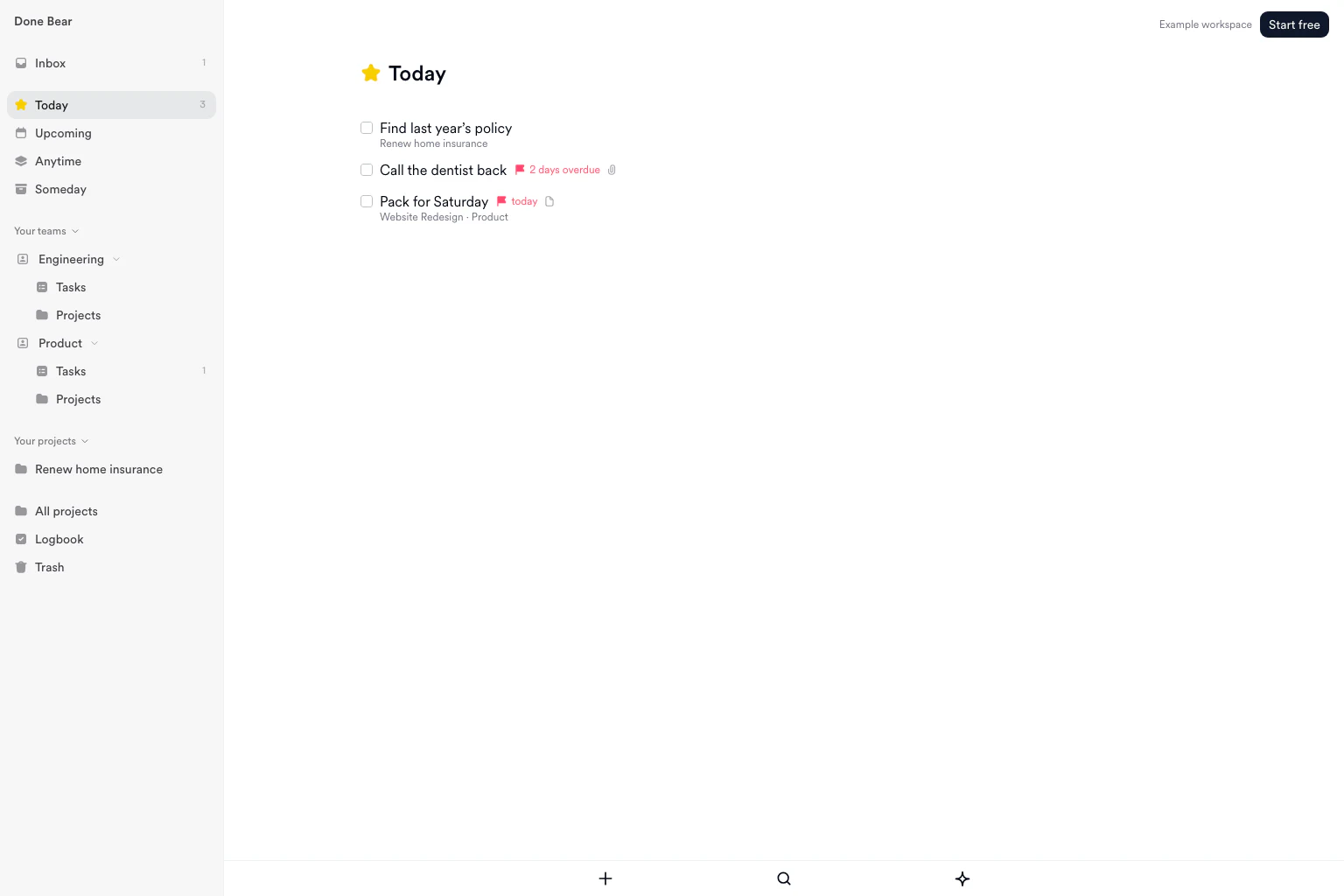
The five lists in Done Bear. They are in the Windows app too. Select the image to see it full size.
ChatGPT and Claude can read this list and add tasks to it, so there’s no second list for an assistant to keep.
Stay on Todoist for integrations, quick add, and karma
Stay on Todoist if you rely on its integration catalog, natural-language quick add, or karma. Stay if you need Android this week: Done Bear has a waitlist, not a store listing. Stay if Todoist’s hosted MCP connector is why the list lives there.
TickTick is the better stay if you want a calendar, habit tracker, and Pomodoro timer next to the list.
Preview a CSV before anything is written
Export one Todoist project as CSV from the web or desktop app, or a Pro or Business ZIP backup of active projects. In Done Bear on the web, open Settings, then Import, choose Todoist, and upload the file. Nothing is written until you confirm the preview. Sections are not imported. Their tasks land in the project, without the section name. Extract the files from a ZIP before uploading.
The Todoist export guide has the full walkthrough. This post does not repeat the steps. The Todoist migration page maps what each concept becomes.
If you searched because Things has no Windows app, that is Things 3 for Windows. This post stays on Todoist. The longer comparison is on Todoist alternatives. The download page covers native install, and how local-first works covers offline use.
Start free and keep this list. No card. Free up to 250 tasks. Current limits are on the pricing page.
One list. Every device.
Frequently asked questions
Does Todoist have a Windows app?
Yes. Todoist ships apps for Windows, Mac, Linux, iPhone, iPad, Android, Apple Watch, and Wear OS, plus the web. The app is not the gap. On it, personal, work, and family still sit in projects and filters you maintain. Done Bear keeps them in one list on the same PC. Stay on Todoist if you rely on its integrations, quick add, or karma.
Why switch from Todoist on Windows?
For one list with the views built in. Done Bear ships Inbox, Today, Upcoming, Anytime, and Someday as its navigation, so there is no filter to fix when it drifts. The same account opens on the Windows app, the web, Mac, Linux, and iPhone. The Windows app needs a connection to start, then keeps working if it drops.
Should I stay on Todoist?
Stay if you rely on its integration catalog, natural-language quick add, or karma. Stay if you need Android this week, because Done Bear has a waitlist, not a store listing. Stay if Todoist’s hosted MCP connector is why the list lives there. TickTick is the better stay if you want a calendar, habit tracker, and Pomodoro timer next to the list.
How do I move a Todoist list onto Done Bear?
Export a project CSV from Todoist on the web or desktop, or a Pro or Business ZIP backup. In Done Bear on the web, open Settings, then Import, choose Todoist, and upload the file. Check the preview before anything is written. Sections are not imported. Their tasks land in the project. Extract the files from a ZIP first.
What should I use instead of Todoist on Windows?
It depends on what you want next to the list. Use TickTick if you want a calendar, habit tracker, and Pomodoro timer in the same app. Use Done Bear if you want one list, Inbox through Someday, on a Windows app and the web, with the same list on iPhone. Stay on Todoist if integrations or Android this week keep you there. Start free, no card.
Sources
- Todoist: Download Todoist for apps on Linux, Mac, Windows, iPhone, iPad, Android, Apple Watch and WearOS, plus browser extensions and email add-ons.
- Todoist: Import or export a project as a CSV file for CSV export per project on Beginner, Pro and Business, on web, macOS and Windows, excluding completed tasks.
- Todoist: Connect Todoist to an AI assistant for hosted MCP at ai.todoist.net/mcp.
- TickTick: Download TickTick for Windows, macOS, Linux, iOS, Android, and a web app.
- Done Bear: Windows for the native Windows app with five GTD views.
- Done Bear: Things 3 for Windows for the Things-on-Windows path.
- Done Bear: How to export your Todoist data for project CSV and backup routes, and what each file misses.
- Done Bear: Migrate from Todoist for the concept map and a read-only import.
Import your list
Create your account, then preview your import before adding tasks. Keep your original list while you check the result. Free up to 250 tasks, completed tasks included. No credit card.
Get new posts by email
New writing on GTD, local-first software, and building a calm task manager, sent when it is published. Nothing else, and you can leave any time.